Web Authentication Methods Explained: Pros, Cons, and Best Practices (2026 Guide)
Comprehensive guide to authentication in web applications, from Basic and Digest Auth to sessions and JWTs. Learn how these mechanisms work, their security trade-offs, and how to apply them effectively in modern, scalable system architectures.
Authentication is one of the core building blocks of any modern system or product; without it, a product is borderline unusable. Despite its importance, authentication remains a widely misunderstood concept in the field of Software Engineering, especially among beginners. This article aims to provide an overview of commonly used authentication methods for building modern applications.
To begin with, it is important to understand what "authentication" is and why it is necessary.
Authentication is the process of verifying and establishing the identity of a user, device, or application before granting access to a system or resource. It ensures that only authorized entities can interact with sensitive data or services, and it typically involves the following steps:
- Identification: The user claims an identity, for example, by providing an email address, username, or another identifier, along with an associated secret such as a password.
- Authentication: The system verifies the identity by validating the provided credentials.
- Authorization: The system determines whether the authenticated user has the necessary permissions to access protected resources.
In this article, we will primarily focus on the second step, i.e., authentication, and discuss commonly used methods for applications served over a network. These methods include:
- Basic Authentication (BA)
- Digest Authentication (DA)
- Session-based Authentication
- Token-based Authentication (e.g., JWTs, access/refresh tokens)
NOTE: You may often encounter OAuth 2.0, SSO/SAML, and OIDC in discussions related to user authentication for web applications. These are not authentication methods themselves but authentication/authorization frameworks built on top of the methods discussed above. A detailed discussion of these topics is beyond the scope of this article.
Basic Authentication (BA)
One of the earliest and simplest mechanisms of authentication defined in the
HTTP specification (RFC 7617) is the
"Basic HTTP Authentication" scheme. As per this specification, user credentials
(username and password pairs) are transmitted to the server encoded as Base64
strings. These encoded credentials are included in the Authorization header,
which the server decodes to validate the credentials and subsequently authorize
access to protected resources, if applicable.
In other words, if a client makes the following hypothetical initial HTTP request:
GET /api/orders HTTP/1.1
Host: example.com
The server responds with the following information:
HTTP/1.1 401 Unauthorized
WWW-Authenticate: Basic realm="orders"
This indicates that the server requires the client to authenticate using the
"Basic Authentication" scheme for the protected orders resource. At this
point, the client may either abort the request or proceed by providing a
username (e.g., an email address) and a password in plaintext. These
credentials are concatenated in the format <username>:<password> (e.g.,
john-doe:secret-password) and subsequently encoded using Base64 (e.g.,
am9obi1kb2U6c2VjcmV0LXBhc3N3b3Jk).
Once encoded, the client includes these credentials in the request as follows:
GET /api/orders HTTP/1.1.
Host example.com
Authorization: Basic am9obi1kb2U6c2VjcmV0LXBhc3N3b3Jk
The server receives the encoded credentials, decodes them, and validates them by performing a database lookup. If the validation is successful, it responds to the client with the following response, indicating an authenticated state for the user.
HTTP/1.1 200 OK
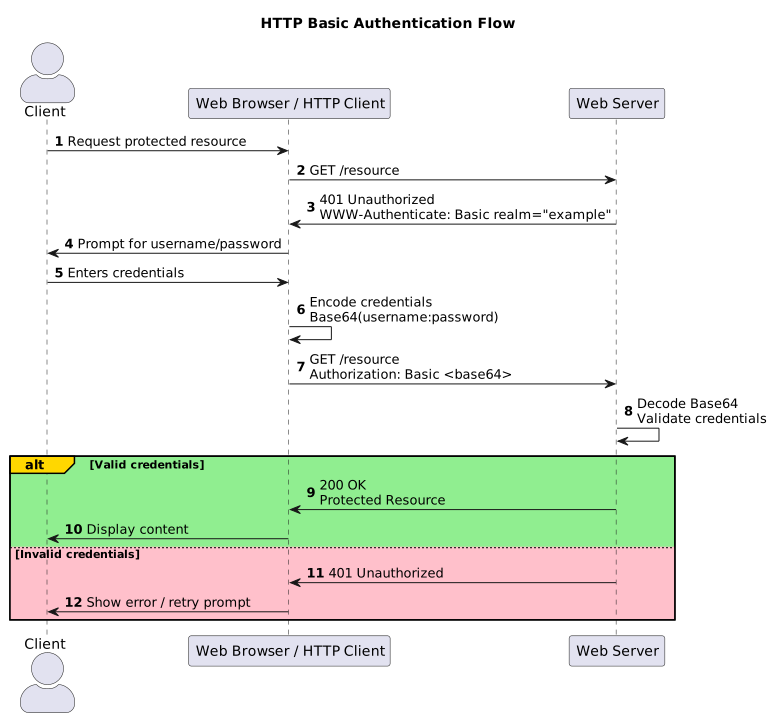
The following diagram provides a visual representation of the specification:
A key caveat of this approach is that Base64-encoded credentials can be trivially decoded, which introduces a significant security vulnerability. Since user credentials are effectively transmitted over the network in plaintext (albeit encoded), intercepting and decoding them can have severe consequences for systems handling sensitive information. Due to this inherent risk, such authentication mechanisms are rarely used outside of controlled environments (e.g., intranet or air-gapped systems). Furthermore, its use without HTTPS is strongly discouraged, as it exposes the system to man-in-the-middle (MITM) attacks, enabling attackers to intercept and compromise user credentials.
Digest Authentication (DA)
To address the inherent security drawbacks of the "Basic Authentication" scheme, RFC 2069 was introduced. This specification was later updated to provide improved security (see RFC 2617), which we will discuss in this section.
Similar to "Basic Authentication", in this method the client initiates a request to the server with the following information:
GET /api/orders HTTP/1.1
Host: example.com
The server then responds with a challenge containing the following information:
HTTP/1.1 401 Unauthorized
WWW-Authenticate: Digest
    real="orders",
    nonce="f84f1cec41e6cbe5aea9c8e88d359",
    algorithm=SHA-256,
    qop="auth"
Unlike the server response in the case of the "Basic Authentication" method, the
server responds differently in this scenario. The WWW-Authenticate header
includes a value of Digest, a realm indicating the protected resources on
the system, a nonce (a server-generated value used to prevent replay attacks),
an algorithm, and qop ("quality of protection").
The client constructs the digest based on this response by computing a "response" value, which consists of two components: HA1 and HA2.
HA1 is derived by hashing username:realm:password (e.g.,
john-doe:orders:secret-password) using a specified algorithm (e.g., SHA-256).
HA2 is derived by hashing method:uri (e.g., GET:/api/orders). The final
"response" value is computed by hashing HA1:nonce:nc:cnonce:qop:HA2, where
nc and cnonce represent the nonce count and a client-generated nonce,
respectively.
The computed response is then transmitted to the server as follows:
GET /api/orders HTTP/1.1
Host: example.com
Authorization: Digest
  username="admin",
  realm="orders-api",
  nonce="f84f1cec41e6cbe5aea9c8e88d359",
  uri="/api/orders",
  algorithm=SHA-256,
  response="753927fa0d8b4e...",
  qop=auth,
  nc=00000001,
  cnonce="0a4f113b"
With this approach, the password is never transmitted over the network in plaintext; instead, only hashed values are exchanged, with the final "response" hash being sent to the server. The server may store HA1 for subsequent validations and recompute HA1, HA2, and the final "response" hash to compare it against the client's provided value. If the values match, the server authorizes the user to access the protected resources and responds with the following:
HTTP/1.1 200 OK
The following diagram provides a visual representation of the authentication mechanism for better clarity:

Some drawbacks of this method include:
- Susceptibility to man-in-the-middle (MITM) attacks when HTTPS is not used.
- An attacker can authenticate to the system if the HA1 hash is compromised.
- Nonce values require strict validation, which can be difficult to implement correctly and securely.
While the "Digest Authentication" method provides significantly better security than "Basic Authentication", it is still not a recommended approach in modern systems.
Session-Based Authentication
The previously discussed methods are not widely used today due to the vulnerabilities and security concerns outlined above. Instead, "session-based authentication" is the de facto standard when building modern web applications.
Similar to the previous methods, in this approach the client initiates a request to a protected route as follows:
GET /api/orders HTTP/1.1
Host: example.com
The server responds with a 401 Unauthorized HTTP status code. The client may
then either abort the request or redirect to an unprotected route (e.g.,
/login) responsible for handling user authentication. This route typically
presents an HTML form to capture user credentials.
When the user submits the form, the credentials are transmitted to the server as URL-encoded form data, as shown below:
POST /login HTTP/1.1
Content-Type: application/x-www-form-urlencoded

username%3Djohndoe%0Apassword%3Dsuper-secret-password
The server decodes the request body, parses the credentials, and validates them by performing a database lookup to verify whether the hashed version of the provided password matches the stored value. If the credentials are valid, the server proceeds to create a session for the user.
A session typically contains a unique session identifier, a user identifier associated with the authenticated user, and a timestamp to enforce session expiration. This session data is commonly stored in an in-memory data store such as Redis or a persistent database such as PostgreSQL.
An example schema for the session data is as follows:
| session_id | user_id | expires_at |
|---|---|---|
af6d2c82-af1a-46d7-85b7-29e28c1be109 | 3bb1ff78-0300-4e6b-935c-a7d5797226dd | 1777456473 |
Once the server has generated the session data and persisted it in a database, it responds to the client as follows:
HTTP/1.1 200 OK
Set-Cookie: session_id=c; HttpOnly; Secure; SameSite=Strict
The response sets a cookie on the client containing the session_id, along with
various security attributes such as:
HttpOnly, to prevent client-side JavaScript access and mitigate XSS attacks.Secure, to ensure the cookie is transmitted only over HTTPS connections.SameSite, to help prevent and mitigate CSRF attacks.
For subsequent client requests, the server can directly look up the session_id
in the database, validate its expiry, and authorize the user accordingly (or
reject the request if the session has expired), thereby avoiding repeated
credential validation and password handling.
GET /profile HTTP/1.1
Cookie: session_id=af6d2c82-af1a-46d7-85b7-29e28c1be109
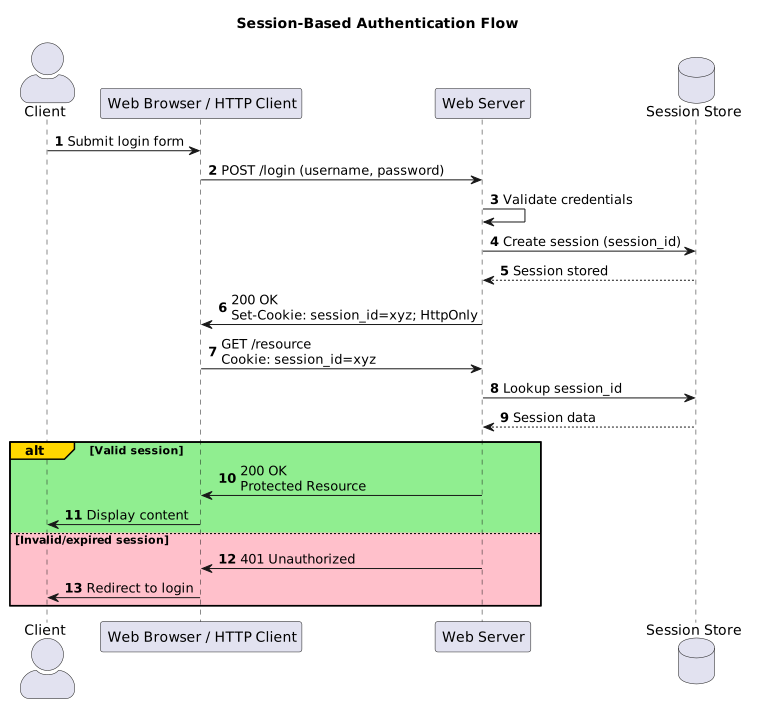
The following diagram provides a visual representation of the "session-based authentication" mechanism, offering an abridged view of the process.
While "session-based authentication" addresses many of the limitations associated with the "Basic Authentication" and "Digest Authentication" mechanisms, it is not without its own shortcomings.
For instance, leakage of session data can allow an attacker to authenticate to the system. Session data should be kept minimal to reduce the blast radius in the event of a compromise. Additionally, session identifiers should be regenerated upon successful authentication and invalidated upon logout; failure to do so can result in session fixation vulnerabilities. Improper handling of session expiry can also lead to effectively unbounded session lifetimes.
Since sessions must be persisted in a datastore, scalability becomes a concern, often necessitating a shared store beyond the server's in-memory state. Depending on the application's scale, complexity, and user base, this can introduce additional operational overhead and cost if not architected appropriately.
Token-Based Authentication
So far all the authenication methods we've read so far all have certain shortcomings which cannot be compromised with in today's day and age. Be it the security concerns of the "Basic Authentication" or "Digest Authentication" methods or the scalability concerns of "Session-based Authentication", they all have shortcomings. To answer these shortcomings, most modern applications today rely on "Token-based Authentication" method(s).
In this method, the server processes the user credentials to provide the client with a signed JSON Web Token (JWT). Proposed in 2015 in the RFC 7519, JWTs are signed pieces of information transmitted between services/applications (such as a web app and its API server). These tokens are digitally signed using symmetrical (HMAC) or assymetrical (RSA/ECDSA) algorithms to ensure their integrity and authenticity of the information.
The structure of the JWT consists of three parts - The header, the payload and a secret token to be used for the digital signature.
The header part looks very similar to the following format where alg defines
the cryptographic algorithm used for signing the token and typ defines the
type of the token used;
{
  "alg": "HS256",
  "typ": "JWT"
}
The payload contains claims (e.g., roles) along with relevant user-related data. For example:
{
  "sub": "1234567890",
  "name": "John Doe",
  "admin": true
}
The signature component is a cryptographic value, typically represented as a
long alphanumeric string (e.g., 256 to 512 bits, depending on the signing
algorithm used). For example: super-secret-not-long-enough-string.
Putting it all together, the server derives the token by signing it using a cryptographic algorithm such as HMAC-SHA256:
hmacsha256(base64(header).encode() + "." + base64(payload).encode(), secret)
A comprehensive discussion of the JWT specification, along with its associated security considerations, is beyond the scope of this article and warrants a dedicated write-up. Therefore, I will not go into further detail here and instead recommend the following resource: jwt.io, which provides an intuitive web interface for learning about and debugging JWTs.
That said, similar to the login flow described in the "session-based
authentication" method, the client transmits user credentials to the server as
application/x-www-form-urlencoded data. If the credentials are valid, the
server responds with the following response body:
HTTP/1.1 200 OK
Content-Type: application/json

{
  "msg": "login successful",
  "access_token": "eyJhbGciOiJIUzUxMiIsInR5cCI6IkpXVCJ9.eyJzdWIiOiIxMjM0NTY3ODkwIiwibmFtZSI6IkpvaG4gRG9lIiwiYWRtaW4iOnRydWUsImlhdCI6MTc3NzU0NjIyMH0.KytJeYrwkSQG3ayGUjnTIjajLyYCBImu1VhxxrtvmPXl5GoaLoJ6LOYfQI4M6qM9d6SVDHSe2VafUNZxnwfs2Q"
}
The client can accept the token and store it in the user's browser for
subsequent use. Although the token can be stored in localStorage, this is
generally not recommended-especially if it contains sensitive information.
Instead, it is preferable to store the token in a secure cookie.
For subsequent requests to protected routes, the client can retrieve the token from browser storage and include it in the request as follows:
GET /profile HTTP/1.1
Authorization: Bearer "eyJhbGciOiJIUzUxMiIsInR5cCI6IkpXVCJ9.eyJzdWIiOiIxMjM0NTY3ODkwIiwibmFtZSI6IkpvaG4gRG9lIiwiYWRtaW4iOnRydWUsImlhdCI6MTc3NzU0NjIyMH0.KytJeYrwkSQG3ayGUjnTIjajLyYCBImu1VhxxrtvmPXl5GoaLoJ6LOYfQI4M6qM9d6SVDHSe2VafUNZxnwfs2Q"
The token sent to the server contains user-related information (excluding sensitive data such as passwords), along with its expiry, claims/roles, and the cryptographic signature used to sign it. This encoded information is validated by the server, and if the validation is successful, the server responds to the client with the following:
HTTP/1.1 200 OK
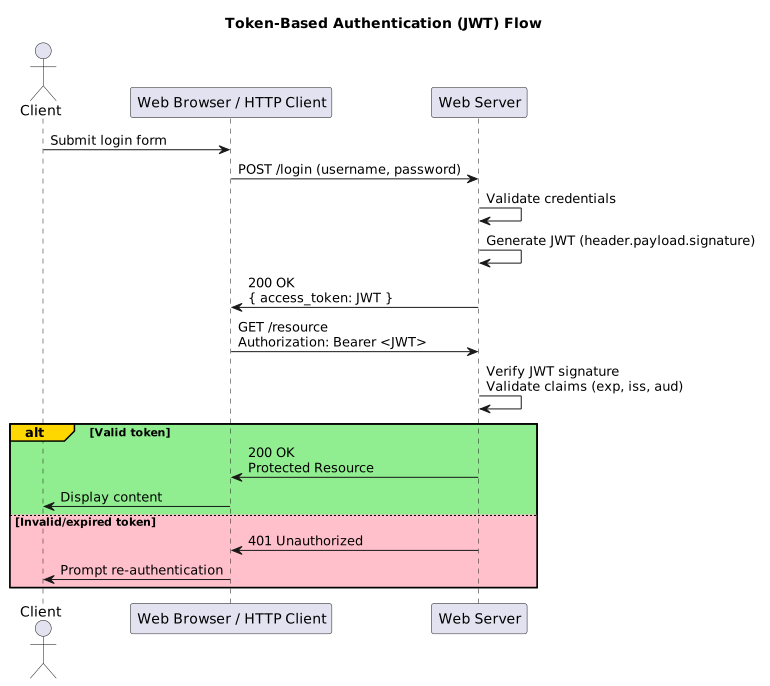
The following diagram provides an abridged representation of the process, illustrating its underlying flow and logic:
As discussed, "token-based authentication" addresses many of the limitations observed in earlier methods:
- No sensitive data (such as passwords) is transmitted over the network, and secure cryptographic algorithms are used to ensure integrity and authenticity.
- No session state is stored in a server-side database, allowing the system to remain stateless and scale without significant bottlenecks.
These advantages have contributed to JWTs gradually replacing even "session-based authentication" in many modern architectures since their introduction.
However, "token-based authentication" is not a silver bullet. Like the previously discussed methods, it has its own set of caveats:
- JWTs encode claims and metadata using Base64, which is easily decodable. Therefore, sensitive information such as passwords must never be included in the token payload.
- Tokens are effectively handed over to the client and cannot be directly
controlled once issued. Storing them in insecure locations such as the
browser's
localStorageis discouraged; secure cookies are the recommended approach. - Tokens are inherently difficult to invalidate, which can lead to prolonged authenticated sessions. This can be mitigated by maintaining a token revocation list, enforcing expiry timestamps, and validating them on the server. A more robust approach involves issuing short-lived access tokens alongside refresh tokens.
In practice, for most modern applications, "token-based authentication" is often the preferred approach unless constrained by specific requirements, in which case "session-based authentication" remains a viable alternative.
For example, many public-facing APIs (such as the
Reddit API)
require environment variables like CLIENT_SECRET and ACCESS_TOKEN for
automated authentication. Under the hood, these services use such credentials in
place of traditional username/password pairs to issue and manage tokens
associated with the client or application.
Final Words
Understanding the various authentication mechanisms used in modern web applications along with their trade-offs and appropriate usage patterns can be non-trivial, particularly during the early stages of a software engineering career. This article consolidates those concepts into a single, structured overview, with the intent of serving as a practical reference for both beginners and practitioners.
It is also worth clarifying that terms such as OAuth 2.0, OpenID Connect (OIDC), and SSO are often misinterpreted as authentication methods. In reality, these are higher-level authentication and authorization frameworks built on top of underlying mechanisms such as token-based authentication. A detailed discussion of these frameworks is beyond the scope of this article and is best addressed separately.
In conclusion, selecting an authentication strategy is a matter of aligning security requirements, scalability constraints, and system architecture. There is no universally optimal solution since each approach involves trade-offs that must be evaluated in context.
If you have any questions or encountered challenges while understanding these concepts, feel free to reach out. Feedback and discussion are always welcome.
Continue Reading...
Web Authentication Methods Explained: Pros, Cons, and Best Practices (2026 Guide)
Comprehensive guide to authentication in web applications, from Basic and Digest Auth to sessions and JWTs. Learn how these mechanisms work, their security trade-offs, and how to apply them effectively in modern, scalable system architectures.
Read more Sunday, 21 February 2021 at 12:00 amCreate an Overpowered Hugo Blog (as an WordPress Alternative)

Discover the power of blogging with Hugo! Explore a WordPress alternative offering ease and efficiency. Learn to set up Hugo, leverage GitHub Actions for automation, and utilize Forestry as a CMS. Elevate your blog with Hugo’s simplicity and GitHub’s power.
Read more Saturday, 4 September 2021 at 12:00 amAn Automated and Modern Workflow for Using LaTex

Revitalize your LaTeX workflow with modern tools! Sidestep TeX Live's bloat and Overleaf's online constraints. Embrace `tectonic`—a Rust-based, efficient LaTeX engine. Harness `task` for streamlined automation. Craft modular documents with `subfiles` for seamless collaboration. Dive into a rejuvenated, efficient LaTeX experience! 🚀📄🔧
Read more